

I didn't want to baffle you guys with tools the forum has. So I've never posted about this. I know some people already use it, it's a common feature on forums.
So if you highlight some text in any post, you should get a little pop-up box with a couple of options in it.
[automerge]1570975986[/automerge]
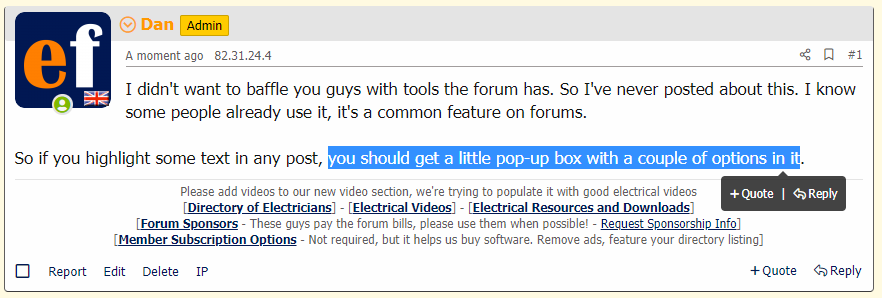
You can then add the quoted bit to a list you're about to reply to. So you can quote the same post 3 or 4 times and cut out the waffle. Or even quote 1 line in 4 posts on different threads (and the forum will remember what you've highlighted).
And then reply to just those, like this.
And it'll stick your quoted bit you grabbed in a message.
This works on 99% of devices. Mobile and desktop.
[automerge]1570976036[/automerge]
@Lucien Nunes @telectrix @Pete999 @westward10
Just to tag in some people who quote quite a bit. Tag more if you think of more.
So if you highlight some text in any post, you should get a little pop-up box with a couple of options in it.
[automerge]1570975986[/automerge]
You can then add the quoted bit to a list you're about to reply to. So you can quote the same post 3 or 4 times and cut out the waffle. Or even quote 1 line in 4 posts on different threads (and the forum will remember what you've highlighted).
And then reply to just those, like this.
you should get a little pop-up box with a couple of options in it
And it'll stick your quoted bit you grabbed in a message.
This works on 99% of devices. Mobile and desktop.
[automerge]1570976036[/automerge]
@Lucien Nunes @telectrix @Pete999 @westward10
Just to tag in some people who quote quite a bit.
Tag more if you think of more.


