happysteve

~
Broke Internet
Arms
Supporter
happysteve submitted a new resource:

EICR - Electrical Installation Condition Report - BS7671 2018 + A2:2022 - Fillable EICR PDF form for 18th Edition Amendment 2

EICR (Electrical Installation Condition Report) based on the IET Model Forms, for BS7671:2018 + A2:2022 (18th Edition, Amendment 2). Fill out the form using (the free) Adobe Acrobat Reader, then sign digitally and print/send off.

Created from scratch by happysteve, using OpenOffice

Provided "as is" with no support offered - if it doesn't work on your computer/tablet/phone with your particular PDF reader then it's very unlikely I'll be able to help you - if it does work for you, I hope it's...

Read more about this resource...
 
hi steve
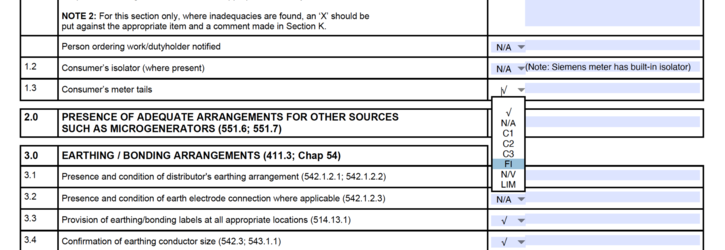
there doesn't seem to be a tick option in the boxes in the CONDITION REPORT INSPECTION SCHEDULE FOR RESIDENTIAL Ref: AND SIMILAR PREMISES WITH UP TO 100A SUPPLY NOTE: section
is it possible to add one in ? regards gc
Which bit? Do you mean, on the inspection schedule?
Screenshot 2022-10-29 at 10.20.27.png
I see ticks...
 
Hello Happysteve.
I wish to firstly thank you to make thous pfd forms, grat job Thank You.

Can you help me with saveing them?
Afrer complete the form i try to save it to print it later on but it dosnt, its save as a blank form. All data are gone. Do you know why?
 
Hello Happysteve.
I wish to firstly thank you to make thous pfd forms, grat job Thank You.

Can you help me with saveing them?
Afrer complete the form i try to save it to print it later on but it dosnt, its save as a blank form. All data are gone. Do you know why?
I had similar problems when I started using them a few years ago. I then changed to using Adobe acrobat and all was fine. Some other pdf readers don't seem to work well (ie leave it blank).

I think Steve should spend a bit more time on these forms 😉
 
For me it has to he adobe acrobat. The emphasis being on acrobat. I am not great with computers, but I believe Adobe reader is different.
Are you using acrobat?
 
No idea why it's not working, sorry. Can't offer support I'm afraid. Works on Adobe Acrobat Reader (also Preview on the Mac), I use the forms more or less daily.

Only thing I can think of is, have you downloaded the form to your computer (you are using this on a computer... right..? Rather than an iPad or similar? You don't say... and you don't say what operating system you're using...), rather than editing something you've just downloaded? Are you filling in the form in the stand-alone app, rather than within your browser window?

Download the form, save it somewhere. That's your master blank.
Make a copy
Find the copy on your computer, either in file manager, or Finder, or whatever
Open the file with Adobe Acrobat Reader
Fill it in (or just a field or two)
Save it
Quit Adobe Acrobat Reader
Load the form again... are you saying the things you typed in are blank/gone?

Now, a few years ago, there was an issue with incompatibility between forms filled out in Acrobat and viewed in other viewers (such as Apple's Preview). For this reason, I always make a "flat" version of the final PDF, once I've added my digital signature - I use something called "PDF Printer" by Feiphone Software (from the Apple Mac store).

If the above doesn't help, I'm sorry, but that's all I've got. Good luck! :)
 

OFFICIAL SPONSORS

Back
Top